


Download Matinee – free DVD VIDEO_TS player, easy playback tool
Overview
Matinee is a lightweight, color‑rich video player designed specifically for VIDEO_TS folders ripped from DVDs. If you have a collection of DVD backups stored on your hard drive, Matinee offers a straightforward way to launch and enjoy them without the overhead of full‑blown media suites. The interface takes inspiration from Apple TV, delivering a modern, grid‑based layout that feels both familiar and inviting.
Once opened, Matinee scans
your selected directories for VIDEO_TS folders, automatically
generating a thumbnail carousel that lets you browse titles with a single
click. The software also supports cover‑art display, random shuffle playback,
and full‑screen mode with native DVD controls such as play, pause, stop,
fast‑forward, and rewind. Integration with popular ripping utilities like
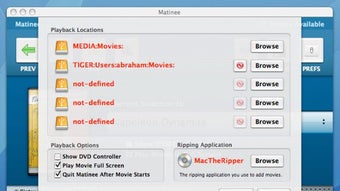
MactheRipper makes the workflow seamless: rip the DVD, let Matinee
locate the folder, and start watching instantly.
Because the application focuses solely on DVD‑style video structures, it remains fast, responsive, and free of the bloat that can slow down generic video players. Whether you are a casual movie lover looking to relive classic titles or a collector curating a personal library, Matinee provides a secure, easy‑to‑use platform for playback on Windows, macOS, and Linux systems.
Key Features
- Intuitive Apple TV‑style interface with bright icons and smooth navigation.
- Automatic detection of
VIDEO_TSfolders across multiple drives. - Cover‑art support – display movie posters for each title.
- Green back and forward arrows for quick browsing of your collection.
- Shuffle (Mix) button to randomize playback order.
- Full‑screen mode with native DVD controls (play, pause, stop, fast‑forward, rewind).
- Compatibility with MactheRipper and other DVD ripping tools.
- Lightweight footprint – ideal for older hardware and low‑spec PCs.
- Free to download and use, with regular security updates.
- Cross‑platform support for Windows, macOS, and Linux.
Each feature has been crafted with the end‑user in mind. The visual design mimics the polished look of modern streaming devices, reducing the learning curve for anyone familiar with Apple TV or similar platforms. Automatic folder detection eliminates the tedious process of manually adding each DVD file; simply point Matinee to the root directory, and it builds a browsable library in seconds.
The cover‑art feature pulls image files named
folder.jpg or cover.png from the same folder, giving
your collection a cinematic feel. For those who love surprise viewings,
the Mix button randomizes playback, turning a static library into a dynamic
movie night experience. The full‑screen mode hides the desktop and brings
the video to the forefront, while the DVD control overlay mimics the original
disc experience, allowing precise navigation without leaving the player.
All of these capabilities are delivered in a free, secure package that receives regular updates to keep pace with operating‑system changes and emerging security standards.
Installation & Compatibility
Step‑by‑Step Installation Guide
- Visit the official Matinee download page and click the Download button for your operating system.
- Save the installer (
.exefor Windows,.dmgfor macOS, or.tar.gzfor Linux) to a convenient location. - Run the installer and follow the on‑screen prompts:
- Accept the license agreement.
- Choose an installation folder (default is
C:\Program Files\Matineeon Windows). - Optionally create a desktop shortcut for quick access.
- After installation, launch Matinee from the Start menu (Windows), Applications folder (macOS), or via the terminal command
matinee(Linux). - When the main window appears, click the Browse button, navigate to the root folder that contains your
VIDEO_TSdirectories, and confirm. - The application will scan and display thumbnails; double‑click any thumbnail to start playback.
Supported Operating Systems
Matinee is built with cross‑platform compatibility in mind. The current stable releases support:
- Windows 10, 11 (64‑bit) – Installer packaged as a standard
.exe. - macOS 10.15 Catalina and later – Distributed as a signed
.dmgwith Gatekeeper support. - Linux distributions – Available as a
.tar.gzarchive; compatible with Ubuntu 20.04+, Fedora 33+, and Debian‑based systems.
Minimum system requirements are modest: a dual‑core CPU, 2 GB RAM, and a graphics card capable of 720p video decoding. Because Matinee relies on native OS video APIs, performance is smooth even on older machines. The application also respects system dark‑mode settings and automatically adjusts its color scheme to match the host OS theme.
For Linux users, a simple installation script is provided to copy the
binary to /usr/local/bin and create a desktop entry. Windows
and macOS users benefit from an installer that registers file associations
for .VOB and .IFO files, allowing you to open
DVDs directly by double‑clicking the files in Explorer or Finder.
Pros and Cons
What Users Love About Matinee
- Free and lightweight – no hidden fees or subscription model.
- Elegant, Apple‑TV‑inspired UI that feels modern and intuitive.
- Fast automatic scanning of multiple drives for
VIDEO_TSfolders. - Cover‑art display adds a cinematic library feel.
- Full‑screen mode with genuine DVD controls for precise navigation.
- Cross‑platform support – one app for Windows, macOS, and Linux.
- Seamless integration with popular ripping tools like MactheRipper.
- Regular security updates keep the software safe and reliable.
Areas for Improvement
- Limited to DVD‑style
VIDEO_TSfolders; does not play generic video formats directly. - No built‑in subtitle support beyond the DVD subtitles embedded in the VOB files.
- Playlist management is basic – no ability to save custom playlists.
- Linux installer lacks a graphical wizard; requires manual extraction.
- Audio track selection is automatic; no manual channel switching for multi‑language DVDs.
Frequently Asked Questions
Can Matinee play video files that are not inside a VIDEO_TS folder?
Matinee is purpose‑built for DVD‑style VIDEO_TS directories. It does not natively support standalone MP4, MKV, or AVI files. For those formats, consider using a complementary player like VLC alongside Matinee.
Is Matinee compatible with the latest Windows 11 updates?
Yes. The Windows 11 build of Matinee has been tested on both Home and Pro editions. The installer is signed, and the application runs smoothly under the latest security policies.
How does Matinee locate my DVD covers?
Matinee looks for image files named folder.jpg, cover.png, or poster.jpg inside the same directory as the VIDEO_TS folder. If none are found, it will display a generic DVD icon.
Can I use Matinee to play DVDs directly from the disc?
Matinee works with ripped VIDEO_TS folders only. To play a physical disc, first rip it using a tool like MactheRipper, then point Matinee at the resulting folder.
Is there a way to create a custom playlist in Matinee?
Currently Matinee does not include a dedicated playlist manager. Users can rely on the built‑in shuffle (Mix) button or manually queue titles by opening them sequentially.
Conclusion & Call to Action
Matinee fills a niche that many modern media players overlook: a clean,
dedicated environment for watching DVD collections stored as VIDEO_TS
folders. Its free price tag, lightweight design, and Apple‑TV‑style UI make
it an attractive option for users who value simplicity over the feature
bloat of all‑purpose players. While it lacks support for generic video
formats and advanced playlist features, its core strengths—fast scanning,
cover‑art display, and authentic DVD controls—provide a reliable viewing
experience. If you have a library of ripped DVDs and want a secure,
regularly updated player that respects the original disc layout, Matinee
is a solid choice.
Ready to bring your DVD collection back to life? Download Matinee now and enjoy a seamless, colorful playback experience on Windows, macOS, or Linux. The installation takes just a few clicks, and you’ll be watching your favorite movies in full‑screen mode within minutes.
Matinee Review Matinee delivers a focused, elegant solution for DVD playback. Its interface is visually appealing, and the automatic folder detection saves time. While it could benefit from broader format support, the core experience is polished and reliable, earning a solid rating among niche media players.






